
- Home
- Software
- Computer Software
- EventForge Lite – Events & Tickets for WooCommerce
SKU:
EventForge Lite – Events & Tickets for WooCommerce
$44.99 – $299.99Price range: $44.99 through $299.99
Pay securely with Credit or Debit Card at checkout, or pick a fast option below.
EventForge Lite – Events & Tickets for WooCommerce
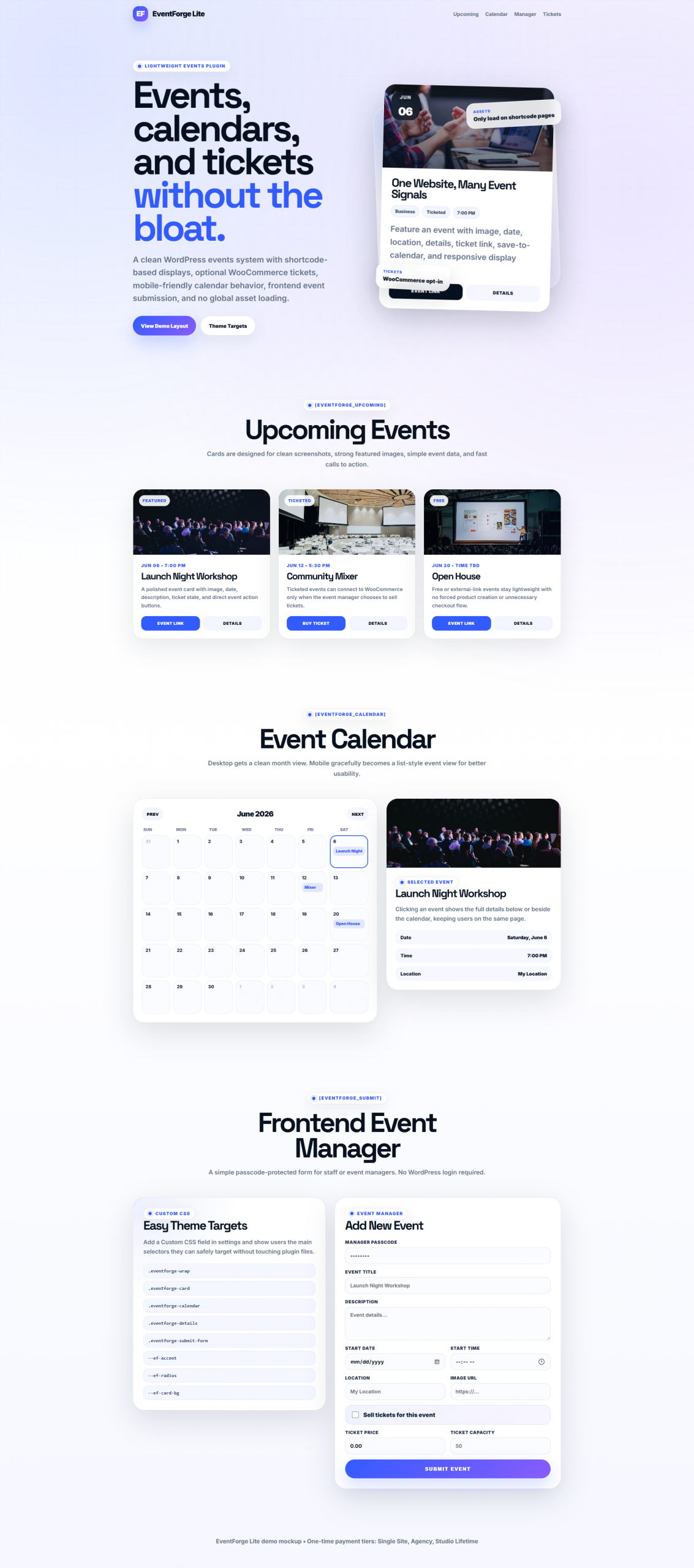
A lightweight WordPress events plugin for upcoming events, responsive calendars, frontend event submission, and optional WooCommerce ticket sales.
Create events, show them anywhere with shortcodes, let trusted staff submit events from the frontend, and sell tickets only when ticketing is enabled.
Agency 10 Sites: $149.99
Studio Lifetime: $319.99
Woo Tickets
Frontend Manager
Responsive Calendar
Conditional Assets
What Is EventForge Lite?
EventForge Lite is a clean, lightweight WordPress events plugin built for small businesses, agencies, local venues, clubs, gyms, restaurants, clinics, workshops, tournaments, fundraisers, and client websites that need events without a bloated event suite.
Display upcoming events, event grids, lists, featured events, and a responsive calendar using shortcodes. Add optional WooCommerce tickets only when an event actually needs ticket sales.
Core Features
- Custom WordPress Event post type
- Event categories and featured event support
- Featured images, descriptions, dates, times, locations, addresses, organizers, and external links
- Upcoming events, grid, list, featured, and calendar shortcodes
- Responsive calendar with desktop calendar view and mobile-friendly list behavior
- Click or tap an event to show details in-page
- Passcode-protected frontend event manager form
- Optional WooCommerce ticket generation
- Ticket price and capacity fields
- ICS save-to-calendar support
- Custom CSS setting with documented selectors
- Frontend assets only load where EventForge shortcodes are used
WooCommerce Ticket Support
WooCommerce is optional. EventForge Lite works as a standalone event display plugin, but when WooCommerce is active you can choose to sell tickets for individual events.
- Tickets are created only when “Sell tickets for this event” is checked.
- No checkbox means no WooCommerce product is created.
- Linked ticket products can use event price and capacity.
- Ticket products are intended to be virtual and hidden from the public catalog.
- Disabling ticketing should disable or draft the linked product instead of deleting it.
Included Shortcodes
- [eventforge_upcoming] – upcoming event cards
- [eventforge_list] – compact event list
- [eventforge_grid] – responsive event grid
- [eventforge_calendar] – responsive event calendar and details panel
- [eventforge_featured] – featured events only
- [eventforge_submit] – passcode-protected frontend event manager
Why Use EventForge Lite?
- Avoid heavy event suites when you only need clean event display and optional tickets.
- Use shortcodes to place events anywhere on a WordPress site.
- Let trusted staff add events without giving them WordPress admin accounts.
- Sell event tickets through WooCommerce when needed.
- Keep frontend assets from loading across the entire site unnecessarily.
Included Files
- Installable WordPress plugin ZIP
- Plugin source files
- README documentation
- Shortcode usage notes
- Custom CSS selector documentation
- WooCommerce ticket setup notes
Who This Is For
- Small business websites
- Agencies and freelancers building client sites
- Local venues, classes, workshops, gyms, clubs, and restaurants
- WooCommerce stores that need simple ticketed events
- Developers who want event shortcodes without a heavy plugin stack
- Anyone who wants events, calendars, and optional tickets with less frontend bloat
Requirements
- WordPress 6.0 or newer recommended
- PHP 7.4 or newer recommended
- WooCommerce required only for ticket sales
- A modern web browser for frontend calendar behavior
License
Personal and commercial use is allowed for your own projects and client projects according to the purchased license tier.
You may not resell, redistribute, repackage, or upload the plugin as a competing product.
Launch Note
This is a digital WordPress plugin download with source code access. Please review the product details before purchase.
Refund Policy: Because this is a digital source-code product with immediate access to the files after purchase, all sales are final. Once the product has been downloaded or accessed, refunds are not available.
6 reviews for EventForge Lite – Events & Tickets for WooCommerce
Only logged in customers who have purchased this product may leave a review.
Aldo Caruso –
Clean interface, responsive calendar, and my clients can submit events from the frontend without touching the admin panel. Five stars.
Thank you so much for this review! I am glad to hear it works for you! I would like to point out that you said "Five stars" but gave it 4. If there is anything I can fix or do better. I will!
Loretta Shaw –
The responsive calendar alone is worth the price. Mobile visitors can actually browse events now without the layout breaking. Highly recommend.
Thank you, Loretta! Your review means so much to me!
Adele Murdoch –
Switched from a heavy event plugin to EventForge Lite and our page speed score jumped 12 points. The WooCommerce ticket integration is seamless.
That was the issue I had. 99.9% of my plugins (including the one I am using to reply to you) was made out of necessity. Tribe Events are WAY too bulky and heavy. Scripts load on every page.. even pages that don't need them.. Thank you so much for the review!
Jin-soo Park –
Finally an event plugin that doesn’t bundle 50 features we don’t need. EventForge is lean, fast, and the ticket sales flow is smooth.
Thank you so much! Yea, 90% of the "features" and scripts are not ever utilized. We all basically use the same things! This just makes sense. I also added the front end (no admin access needed) as a special feature. No one I can think of has one!
Virginia Puckett –
Frontend event submission works perfectly. Attendees can propose their own workshops and we just approve them. Saves us hours every week.
Thank you, Virigina! I just mentioned this in my last response. There is no reason for Event Managers to have to navigate a backend and no reason why the same Event Manager or a Dev should have to create Woo products each time. We just automate it. Makes sense to me!
Miguel Santos –
Exactly what we needed for our venue website. The calendar widget loads fast and the event submission form cut our admin time in half. No bloat, just works.
Thank you Miguel! Appreciate the review!